
Last week a quote landed on my desk: $14,994 for six handheld translation devices. Two-sided screens, charging docks, three years of AI service included. After year three, $480 per device per year to keep them running, which is another $2,880 a year for our six front offices.
The problem they solve is real. A Spanish-speaking parent walks into a school office to pick up a sick kid or ask about enrollment, and the secretary has no good way to talk with them. Pointing at a phone app that half-works is not a plan. Every district I know is dealing with this, and the vendors know it too.
We didn't sign the quote. We built the thing in a day, and it costs us nothing other than time refining it.
What we built instead
It's a webpage. That's the whole product. A secretary opens it on the computer she already has, taps a big button that says Speak English, and talks. Her words show up translated into Spanish, large enough to read across a counter, and a natural Spanish voice speaks them out loud. The visitor taps Hable Español and replies the same way. There's a row of one-tap quick phrases for the common script: sign in here, who are you picking up, the nurse will be right out.
There's a second version for parents. A small sign at the counter says ¿Habla español? with a QR code. The parent scans it with their own phone and gets the same translator, Spanish-first, with their own quick phrases: my child is sick, I'm here for pickup, I want to enroll my child. No district device needed. The parent already brought the hardware.
Under the hood it's one Cloudflare Worker running Meta's open-source translation model, the browser's built-in microphone support, and Google's text-to-speech voices. Nothing is installed, nothing is stored, no student data touches it.
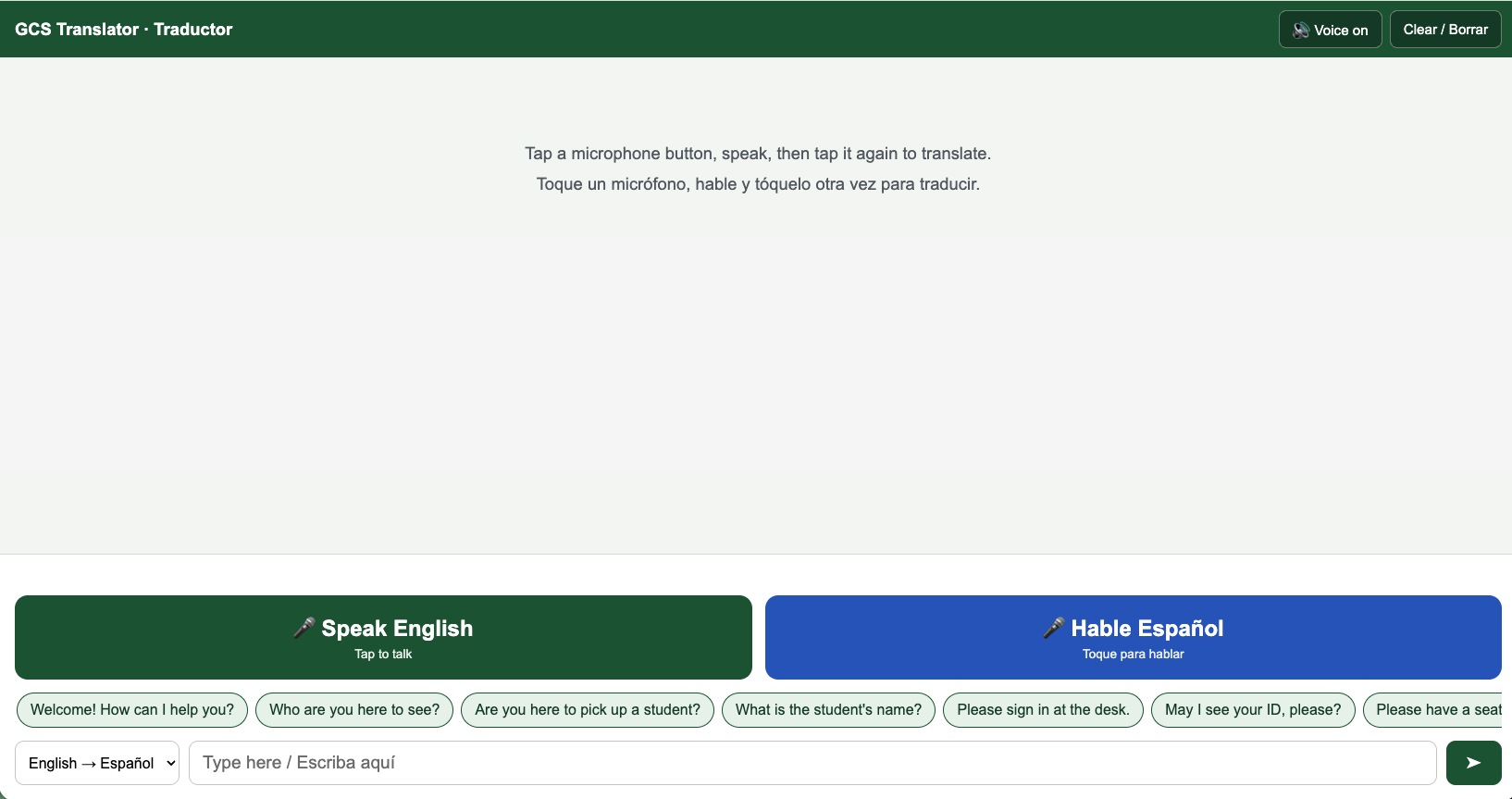
Screenshot of the Translator App
The math
The quote: $14,994 up front for six devices, then $2,880 per year starting in year four. Over five years that's about $20,750.
Our version: $0. The translation model runs on Cloudflare's free tier, and our usage is a rounding error against its daily limit. The voices run on Google Cloud's free tier of one million characters a month; a front-office conversation uses a few hundred. I put a $1 budget alert on the account as a tripwire, and it has never fired. The build took one day.
I want to be fair to the hardware: $2,499 buys a purpose-built device with a warranty and a support line, and for a hospital running hundreds of encounters a day, that might be worth it. But a school front office handles a handful of these conversations a week. Paying $15,000 to solve a handful-a-week problem, when the secretary already has a computer and the parent already has a phone, is the kind of math that should make you put the pen down.
What actually took effort
Writing the code was the easy part. The honest version of this story includes the rest.
Our content filter blocked the app the moment we deployed it, because it lives on a hosting domain the filter distrusts wholesale. The parent QR version saved us there: parent phones on cellular skip the filter entirely, so that half worked on day one while we waited for IT to allowlist the hostname. They did, same day, and then went one better and added it to ClassLink so staff launch it like any other district app. Which means I can also see usage numbers, so adoption is a fact, not a feeling.
We also hit every browser audio quirk known to man. Desktop Chrome's built-in voices fail silently on some machines, Safari refuses to speak without a tap first, and the open-source Spanish voice we tried first had a noticeably gringo accent. Each fix was small, but there were a dozen of them. And the model itself has opinions: it once translated "the principal" as "el jefe," which is why the common phrases are hardcoded rather than left to chance.
None of that required a computer science department. It required a free afternoon and a willingness to test it like a secretary would use it, not like a developer would demo it.
Ask the question before you sign
Districts are about to get buried in AI hardware quotes. Translation devices, tutoring appliances, classroom assistants in a box. Some will be worth it. But the components inside most of them, the translation model, the speech recognition, the voices, are sitting on free tiers right now, reachable from the devices your people already carry.
So before the next $15,000 quote gets a signature, ask one question: is this a device, or is it a webpage wearing a case? Ours turned out to be a webpage. The $14,994 stays in the budget, and the parent at the counter gets helped either way.
Is building your own software now the present and future?